Best webcam setup for tutorial videos
Lighting, framing, eye contact, and virtual backgrounds — practical webcam setup for tutorial creators and screen recording tutorials.
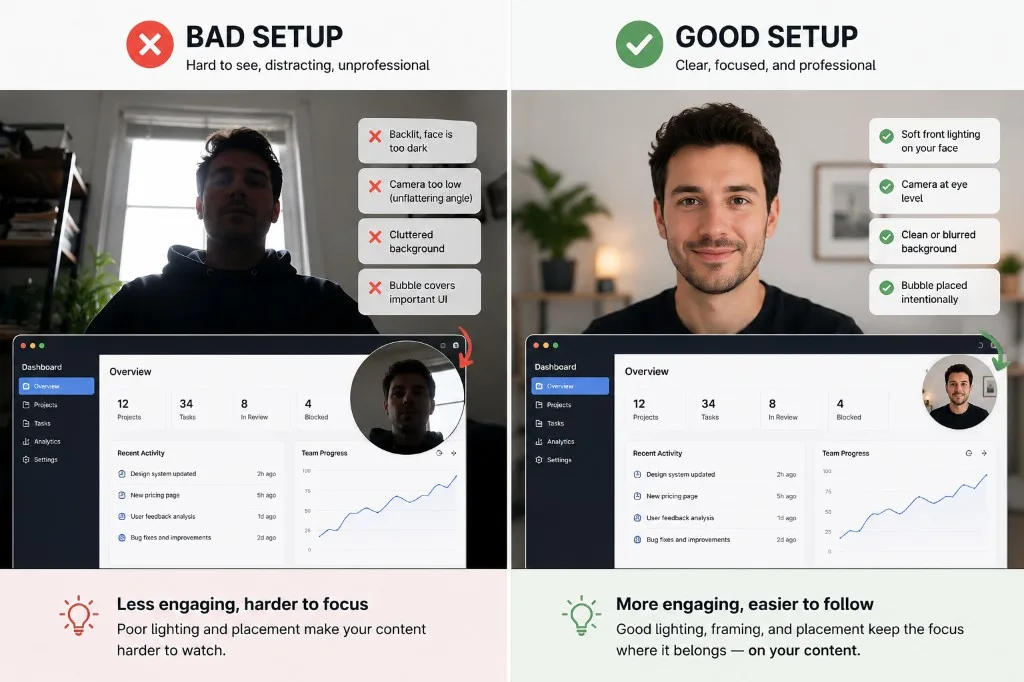
Your screen may carry the tutorial — but your face still shapes trust.
Good webcam setup is less about expensive gear and more about clarity, framing, and comfort. Small adjustments in lighting, positioning, and background can make screen recording tutorials feel dramatically easier to follow. A few habits improve webcam recordings more than buying new hardware.
Light your face, not the room
Soft light from the front (window or lamp) reduces harsh shadows. Avoid strong backlighting from a window behind you; you will look like a silhouette.
Frame head and shoulders
Center yourself with a little space above your head. In Screen + Camera, keep the bubble large enough to read expression but small enough not to cover UI.
Position the camera at eye level
Laptop cameras angled upward often look distracting and unnatural. Raise the device or use an external webcam at eye height so your face reads naturally on camera.
Look at the camera occasionally
Viewers feel more connected when you glance into the lens now and then — not only at the screen. You do not need to stare continuously; brief eye contact during key points is enough for talking-head and bubble clips alike.
Use blur or a background when the room is messy
You do not need a studio. Webcam blur helps reduce visual distractions; gallery backgrounds add a neutral or branded look. Preview before you record so you know what viewers will see.
Place the bubble deliberately
Drag the camera bubble away from buttons, menus, and error messages you are explaining. Recording modes let you switch between a camera bubble and full-screen webcam layout depending on the recording.
Check audio before video polish
Viewers forgive average lighting more easily than muffled audio. Use a quiet room and a decent mic when you can; Showesome captures stereo audio with noise suppression built in.
What is the best lighting setup for tutorial webcam recordings?
Soft light in front of you — window or lamp — not overhead only. Avoid strong backlight so your face stays evenly lit in the bubble.
Where should I place the camera bubble during Screen + Camera?
A bottom corner, clear of menus and CTAs you explain. Drag the bubble before recording; test that it does not cover key UI.
Do I need a virtual background if my room is messy?
Not required — blur often enough. Enable virtual backgrounds if the space behind you distracts from the tutorial.
Related reading
Was this guide helpful?
One vote per browser. No account required.
Be the first to share feedback.
Comments
Join the discussion — comments are moderated to keep things helpful. Be respectful and constructive.
Preparing sign-in…