Why short tutorial clips perform better than long walkthroughs
Attention, cognitive load, and modular screen recording tutorials — why shorter clips often teach more than one long walkthrough.
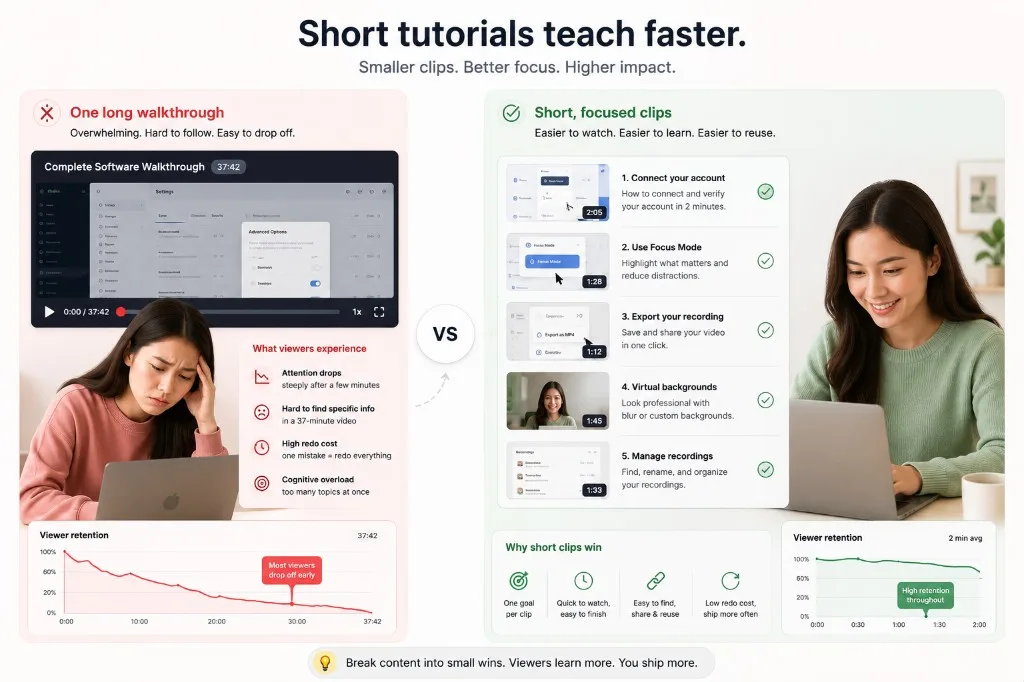
Long walkthroughs feel thorough. They often perform worse than a series of short screen recording tutorials that each answer one question.
Attention drops faster on screen video
Viewers multitask — especially for internal or optional content. After a few minutes, retention falls even if the information is good. A three-minute clip with one goal beats a fifteen-minute tour of every menu.
Cognitive load adds up
Every new panel, shortcut, and side quest competes for working memory. Modular clips let viewers master step one before step two. That is why course creators break lessons into chapters; the same logic applies to quick software demos.
Small wins keep viewers engaged
Short clips feel easier to start and easier to finish. Completing one tutorial builds momentum for the next — especially in async libraries where viewers pick what they need instead of sitting through a full tour.
Shorter clips are cheaper to fix
Miss a click in minute twelve of a long recording and you redo twelve minutes. Miss it in a ninety-second segment and you redo ninety seconds. Lower redo cost means you ship more often.
Search and reuse improve
“How to export” as its own clip is easier to link in docs and Slack than a timestamp in a mega-video. Teams build libraries of small recordings over time.
Break one walkthrough into focused clips
Instead of a single “Complete onboarding walkthrough,” split tutorial creator workflows into:
- How to connect your account
- How to record your first clip
- How to use Focus Mode
- How to export MP4
Each clip has one outcome. Viewers find the step they need; you fix or replace only the clip that changed.
How to record in modules
Outline three to five beats. Record each beat separately. Use Focus Mode to keep each clip visually focused and easier to follow. Pick recording modes per clip — screen-only for UI, camera-only for intros.
Why are short tutorial clips better than one long walkthrough?
Attention and redo cost. Viewers finish modular clips; one forty-minute file often gets skipped. Mistakes are cheaper to fix in a two-minute segment.
How long should a single tutorial clip be?
Roughly two to five minutes per idea — one workflow, one setting, one bug repro. Split longer courses into searchable parts.
How do I split one walkthrough into modular recordings?
Plan sections before you hit Record. Finish one chapter, stop, export or save, then start the next mode with the same mic setup.
Related reading
- How to record a product demo in Chrome — hook, feature, and CTA clips for SaaS demos.
- How creators keep tutorials engaging without heavy editing
- Common screen recording mistakes
- Screen recording tips for remote teams
Was this guide helpful?
One vote per browser. No account required.
Be the first to share feedback.
Comments
Join the discussion — comments are moderated to keep things helpful. Be respectful and constructive.
Preparing sign-in…